Understanding Database Pages
A practical look at how databases store data in pages, why page size matters, and how slotted pages organize rows.
Understanding Database Pages
Usually when we have a query like:
SELECT * FROM table_name
WHERE id = 1;
we may think that the database just goes through all rows and finds the row, and gives it to us.
Well it might be partially true, but it is over abstracted, there is so much to it.
Databases use something called Pages, these are nothing but just fixed block of bytes.
A good example will be a Book, imagine the book as the database, the pages as something that stores the row.
So why does a database use pages?
Most of the time when working with databases, you will come across the term I/O or disk I/O, its just that reading from a disk is slower, so if you reduce that operation, the faster your database becomes.
Lets assume we have 100 rows, and we have to read every single one of them.
If rows were stored and read individually, we would have to perform many separate I/O operations. Disk I/O is expensive, so databases try to reduce the number of these operations.
Instead of storing a single row separately, we store them in groups called pages, its just a fixed block of storage where the rows are present.
Now this block of storage called pages, may contain like 30 to 40 rows depending upon the size, so instead of taking every single row to the memory to read, we now have to take these pages to the memory going from 1000 disk I/Os to 4 or 5.
This also makes caching easier and efficient, as frequently used pages can be cached further reducing the disk I/O.
Not all pages are the same size
A slotted page usually has a fixed size, from 4KB up to 64KB. So why this difference?
Postgres uses 8KB, MySQL uses 16KB and SQLite from 4KB.
A lesser page size gives us small branching factor, deeper tree, less fanout (how many children an internal node can have) which makes the tree longer and more page reads.
And a larger page size gives larger branching factor, wider tree, high fanout.
If searching a B+ tree requires going through 3 levels, we may roughly need 3 page reads, and if it requires 6 levels, it roughly 6 page reads.
HIGH FANOUT → FEWER LEVELS → FEWER PAGE ACCESSES
But this doesn't mean a smaller page size is bad and larger page size is good.
If the database only needs a small amount of information, a 16 KB page may bring more data into memory than necessary, so small random reads may waste more I/O.
Choosing a page size is basically deciding how much data the database reads and caches at once.
Page Layout
What does a page actually look like?
So far, we have treated a page as just a fixed block of bytes.
But that block needs some structure.
The database needs to know things like:
- What kind of page is this?
- Where is the data?
- How much space is available?
- Where are the rows stored?
So a page isn't just random bytes.
It has a layout.
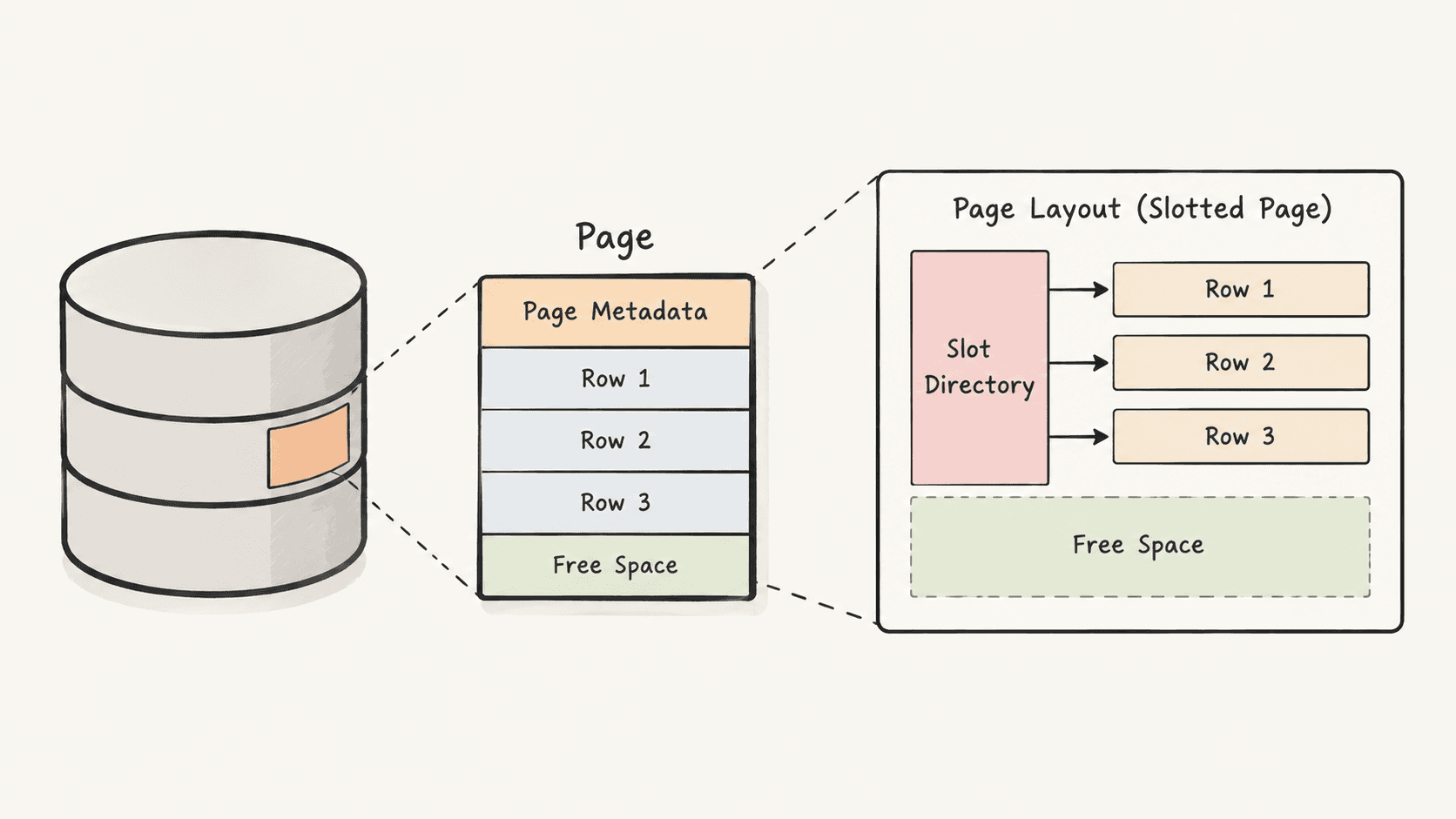
Usually a database page has 3 main parts:
- Page metadata — information about the page itself
- Page data — the actual records, index entries, etc.
- Free space — available space for future inserts and updates
The exact layout depends on the database, but the basic idea is the same: some space is used to describe the page, some stores the actual data, and some can be left available for future changes.
Now this raises another question.
If rows can have different sizes, how does the database know where each row starts and ends?
This is where slotted pages come in.
Slotted Pages
Imagine we have a page containing:
Row 1
Row 2
Row 3
If these rows were simply written one after another, things could become difficult when a row is deleted or grows in size.
For example, if Row 2 is deleted:
Row 1
?????
Row 3
We don't necessarily want to move every other row around just to fill that gap.
Instead, the page can maintain a slot directory that tells us where each row is located.
The important part is that the slot points to the row.
So if the row moves inside the page, the database can update the slot instead of changing everything that refers to it.
This gives us a useful separation:
Slot tells us Where the row is
and Row has the actual data
And now we can see why a database page is more than just a fixed block of bytes.
It is a structured block of bytes that the database knows how to interpret.